If there’s one thing that every business leader, IT manager, and department head can agree on, it’s this: technology is supposed to make our lives easier. And while it often does, there are times when it feels like the exact opposite is true. You know what I’m talking about—those moments when things go wrong, systems don’t work the way they’re supposed to, and the IT headaches keep piling up.
In this blog, we’re going to talk about some of the most common IT nightmares businesses face and, more importantly, how integration can be the solution that saves you from these dreaded scenarios. The truth is, when your systems work together seamlessly, the headaches diminish, and you can get back to focusing on what really matters—growing your business and keeping your customers happy.
Get Started with Aonflow iPaaS – Free Trial Available!
Build and deploy your integrations at zero cost. No credit card required!
The Nightmare of Data Silos
Imagine this: your marketing team is launching a new campaign, but they can’t access the latest customer data because it’s stored in a separate system that only the sales department can access. Meanwhile, your sales team is manually updating spreadsheets with new customer information, and your finance team is struggling to reconcile revenue numbers because they don’t have access to the sales data in real time.
This is the nightmare of data silos, and it’s more common than you think. When data is spread across different systems that don’t communicate with each other, you end up with a fragmented view of your business. Each department operates in its own little bubble, which leads to inefficiencies, duplicated efforts, and missed opportunities.
Integration is the key to breaking down these silos. By connecting your systems—whether it’s your CRM, ERP, marketing tools, or finance software—you can ensure that data flows freely across departments. Suddenly, your marketing team has access to the customer data they need, your sales team can focus on selling instead of data entry, and your finance team can get accurate, real-time insights into revenue.
In short, integration turns your data into a shared resource that everyone can benefit from. It’s like having everyone on the same page of the book rather than each team reading from a different chapter and trying to make sense of it all.
The Pain of Manual Processes
Raise your hand if you’ve ever had to manually transfer data from one system to another. Maybe you’ve exported data from your CRM into a spreadsheet, only to then import that spreadsheet into your accounting software. Or perhaps your HR team spends hours every week manually updating employee information across multiple systems. If you’re nodding along, you’re not alone—manual processes are a huge pain point for businesses everywhere.
Not only are manual processes time-consuming, but they’re also prone to errors. One small mistake—like an extra zero or a misspelled name—can have a big impact, leading to costly errors, frustrated customers, and wasted time fixing problems that shouldn’t have occurred in the first place.
This is where integration can save the day. By connecting your systems and automating the flow of data, you can eliminate the need for manual data entry. Are employee records updated in your HR system? That information is automatically pushed to payroll, benefits, and any other relevant systems. A customer purchases through your e-commerce platform? That data is instantly available in your CRM, inventory, and accounting software.
Not only does this save time, but it also drastically reduces the risk of errors. Your employees can focus on more meaningful work rather than repetitive data entry, and you can rest easy knowing that your data is accurate and up to date.
Disconnected Customer Experiences
In today’s world, customer experience is everything. People expect seamless interactions with your brand, whether they’re shopping online, visiting your store, or speaking with customer service. But if your systems aren’t integrated, providing that kind of seamless experience can be a challenge.
Picture a customer who places an order online and then calls customer service to check on the status. If your e-commerce platform isn’t integrated with your customer service software, the support rep may not have the information they need to answer the customer’s question. This leads to frustration on both ends—your customer is annoyed that they can’t get a simple answer, and your support rep feels powerless to help.
Integration ensures that your customer data is accessible across all touchpoints. When a customer places an order, that information is instantly available to your customer service team, your sales team, and your logistics team. This means that when a customer calls with a question, the support rep can see their order status, shipping information, and any previous interactions—all in one place.
With integration, you can provide the kind of personalized, seamless experience that customers expect. It’s the difference between a customer feeling valued and supported versus feeling like they’re just another number in a disconnected system.
Outdated Systems and Expensive Upgrades
Another common IT nightmare that businesses face is dealing with outdated systems and the high costs associated with upgrading them. Maybe you’re still running a legacy ERP system that requires a team of specialists to maintain, or perhaps your current infrastructure just isn’t capable of handling the growing demands of your business. Either way, the costs—both in terms of money and time—can be daunting.
Integration can offer a way out of this conundrum. Instead of investing in expensive upgrades or overhauling your entire infrastructure, you can use integration to connect your legacy systems with newer, more agile solutions. An Integration Platform as a Service (iPaaS) solution, for instance, allows you to bridge the gap between old and new systems, enabling them to work together without needing a complete replacement.
Think of it like renovating an old house. You don’t need to tear the whole thing down and start from scratch—you can upgrade parts of it, make improvements, and add modern touches while still keeping the structure intact. Integration lets you modernize your IT landscape at your own pace, without the disruption and expense of a full-scale overhaul.
Aonflow is the leading integration platform.
You can kick-start by integrating your first-ever workflow in just a matter of minutes.
The Growing Complexity of Managing Multiple Applications
The average business today uses dozens—sometimes even hundreds—of different applications to manage everything from sales and marketing to HR, finance, and customer service. While each of these applications may serve a valuable purpose, managing them all can quickly become a logistical nightmare. You end up with multiple logins, disconnected data, and a complex web of systems that no one fully understands.
Integration can simplify this complexity by providing a centralized platform where all your applications are connected and managed. Instead of bouncing between different systems, your teams can access everything they need from a single dashboard. Integration makes your tech stack feel less like a patchwork quilt and more like a cohesive system that works together seamlessly.
A great example of this is the concept of a “single source of truth.” When all your systems are integrated, you can create a central repository of data that everyone can trust. This means that when your sales team looks up a customer’s information, they’re seeing the same data as your finance team, your marketing team, and your support team. It eliminates confusion, reduces errors, and ensures that everyone is working from the same set of information.
How to Start Your Integration Journey
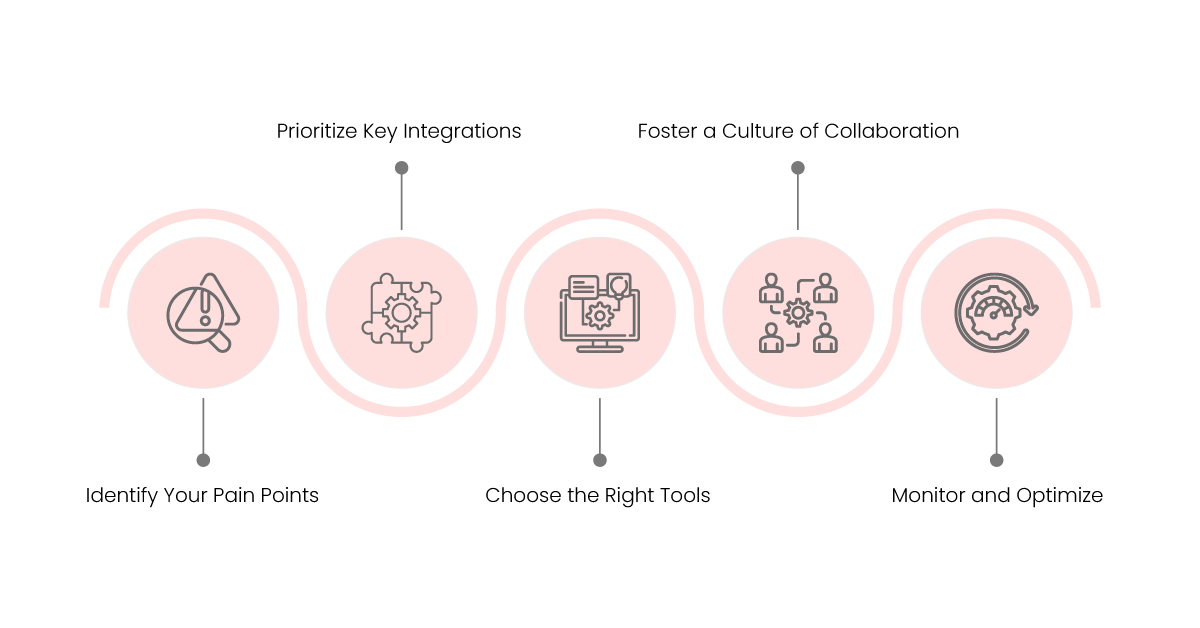
Now that we’ve covered some of the common IT nightmares that integration can solve, let’s talk about how to get started. The thought of integrating all your systems might seem overwhelming, but the good news is that you don’t have to do it all at once. Here are a few steps to help you begin your integration journey:
1. Identify Your Pain Points
The first step is to identify where the biggest pain points are in your current IT landscape. Are your teams struggling with manual data entry? Are customer interactions inconsistent because of disconnected systems? Are you spending too much time and money maintaining outdated infrastructure? By pinpointing the specific problems you want to solve, you can focus your integration efforts on where they’ll have the greatest impact.
2. Prioritize Key Integrations
Once you’ve identified your pain points, prioritize which systems to integrate first. Start with the integrations that will provide the most immediate value—whether that’s connecting your CRM and ERP systems, automating data flow between HR and payroll, or integrating your customer service software with your e-commerce platform. Remember, you don’t have to do everything at once—taking it step by step is perfectly fine.
3. Choose the Right Tools
There are a variety of tools and platforms available to help you integrate your systems. Integration Platforms as a Service (iPaaS) are particularly popular because they offer a cloud-based solution that makes it easy to connect different applications without needing custom code. Whatever tool you choose, make sure it fits your needs and can scale as your business grows.
4. Foster a Culture of Collaboration
Integration isn’t just about connecting technology—it’s also about connecting teams. Encourage collaboration between departments and make sure everyone understands the benefits of integration. When your sales, marketing, finance, and IT teams are all on board and working together, the integration process becomes much smoother.
5. Monitor and Optimize
Finally, integration isn’t a one-time project—it’s an ongoing process. Once your systems are integrated, it’s important to monitor how everything is working and make adjustments as needed. Look for areas where you can further streamline processes, reduce manual work, and improve data flow. The more you optimize, the more value you’ll get from your integrated systems.
Conclusion
IT nightmares are all too common, but they don’t have to be. Whether it’s the frustration of data silos, the inefficiencies of manual processes, or the complexity of managing multiple applications, integration offers a solution. By connecting your systems, automating workflows, and creating a unified view of your business, integration can save you from the headaches that so many companies face.
More importantly, integration empowers your people to work smarter, not harder. It means that instead of spending hours entering data, fixing errors, or trying to find information, your teams can focus on what they do best—whether that’s closing sales, helping customers, or driving new initiatives. When everything works together, the whole business benefits and those IT nightmares become a thing of the past.
So, if you’re ready to put an end to the frustration and unlock the true potential of your technology, consider making integration a priority. It might just be the best decision you make for your business—and your sanity.
Get Started with Aonflow iPaaS – Free Trial Available!
Build and deploy your integrations at zero cost. No credit card required!