Data is the lifeline of businesses. Sales data, in particular, holds a wealth of sensitive information critical for decision-making and strategic planning. However, with the rise of cloud-based solutions and interconnected systems, ensuring the security of this valuable asset has become increasingly complex. This is where iPaaS steps in, offering a comprehensive solution to streamline data integration while maintaining robust security.
We’ll delve into the realm of iPaaS security best practices specifically tailored to safeguarding your sales data. Whether you’re a sales manager, IT professional, or business owner, implementing these practices is essential for protecting your organization’s most valuable asset.
Get Started with Aonflow iPaaS – Free Trial Available!
Build and deploy your integrations at zero cost. No credit card required!
Understanding iPaaS Security
Before delving into the realm of best practices, it’s imperative to establish a solid foundation in iPaaS security. iPaaS, or Integration Platform as a Service, represents a paradigm shift in how organizations integrate their disparate applications and systems. Operating within the cloud, iPaaS seamlessly orchestrates the flow of data across various departments, fostering collaboration, and driving operational efficiency.
Yet, amid the myriad benefits of data integration, lurks the specter of security vulnerabilities. As sensitive information traverses through interconnected systems and applications, it becomes increasingly exposed to a host of cyber threats, ranging from unauthorized access to data breaches. Thus, fortifying the security posture of the iPaaS environment is paramount to safeguarding organizational assets and preserving data integrity.
Understanding iPaaS Security Risks:
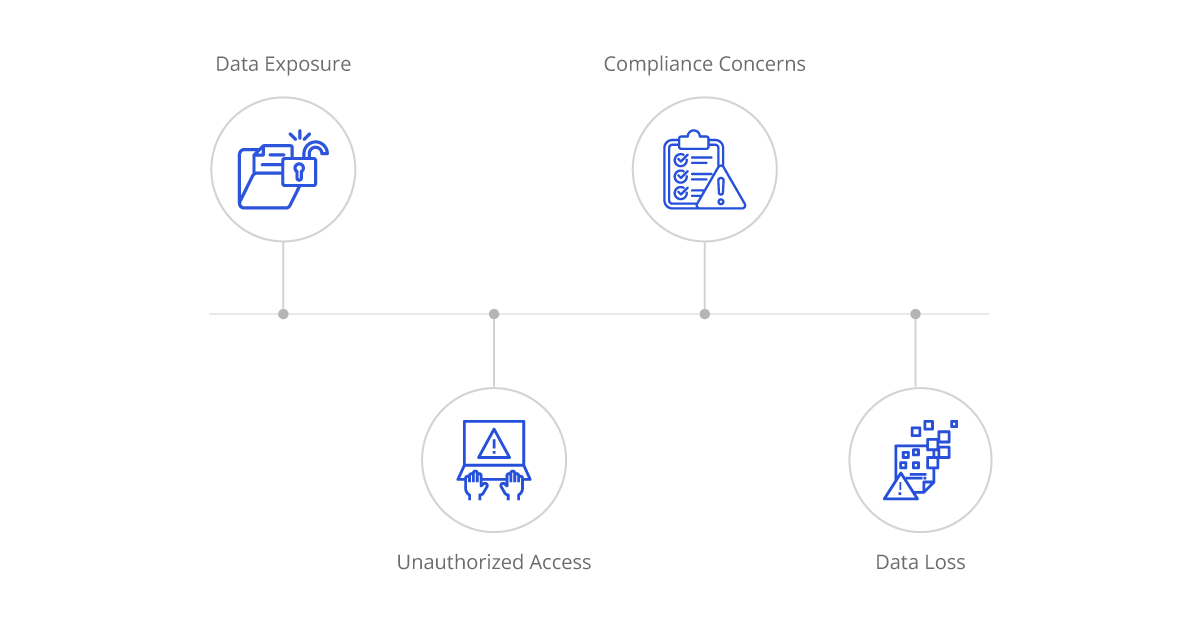
Data Exposure: The interconnected nature of iPaaS exposes data to potential breaches as it traverses between different applications and systems. Without adequate safeguards, sensitive information such as customer data, financial records, and proprietary information may fall into the wrong hands.
Unauthorized Access: Weak authentication mechanisms and inadequate access controls can pave the way for unauthorized users to gain entry into the iPaaS environment. Once inside, malicious actors can exploit vulnerabilities to manipulate data, disrupt operations, or steal sensitive information.
Data Loss: In the event of a system failure or a cyber-attack, the risk of data loss looms large. Without robust backup and recovery mechanisms in place, organizations risk losing critical data, leading to operational disruptions and reputational damage.
Compliance Concerns: Regulatory requirements such as GDPR, HIPAA, and PCI-DSS impose stringent mandates on data protection and privacy. Failure to adhere to these regulations can result in hefty fines, legal repercussions, and irreparable damage to brand reputation.
Best Practices for iPaaS Security
Data Encryption:
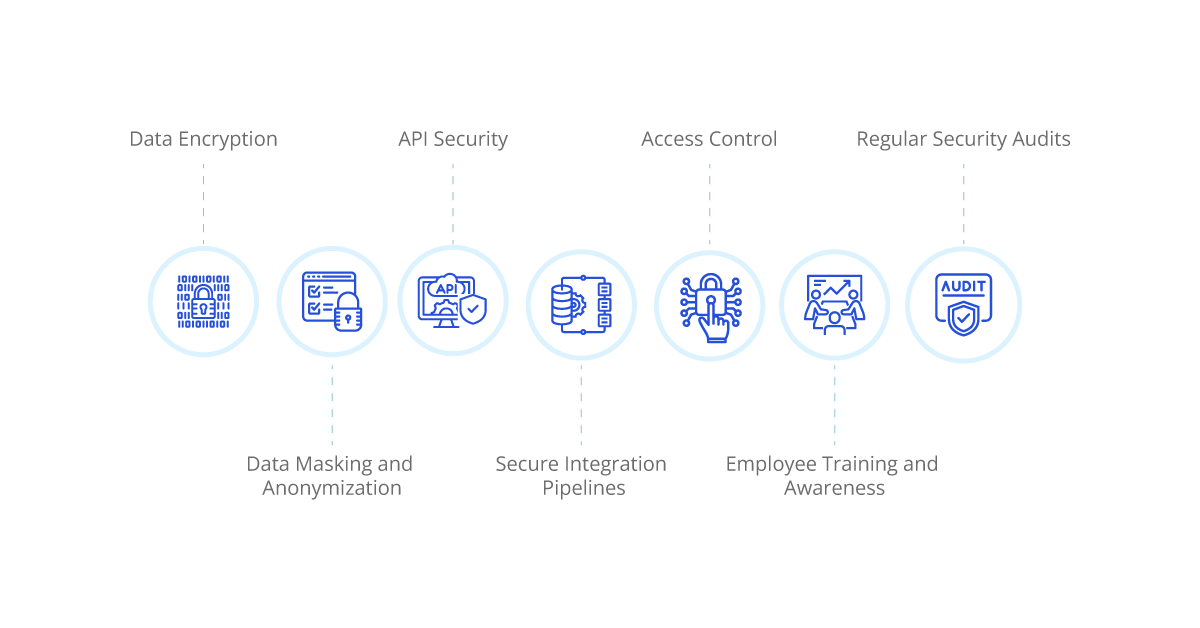
Encrypting sales data during transit and at rest is paramount to prevent unauthorized access and ensure data confidentiality. Implementing industry-standard encryption algorithms such as AES (Advanced Encryption Standard) adds an additional layer of security to sensitive information. By encrypting data both in motion and storage, organizations can safeguard sales data from potential breaches and mitigate the risk of data exposure.
Access Control:
Implementing strict access controls is essential to limit data access based on user roles and permissions. By defining granular access policies, organizations can ensure that only authorized personnel have access to sensitive sales data. Utilizing multi-factor authentication (MFA) further strengthens access controls by requiring users to provide multiple forms of verification before accessing the iPaaS environment. This extra layer of security helps prevent unauthorized access and mitigates the risk of data breaches.
API Security:
Ensuring the security of APIs used for data integration is critical to protecting sales data from potential threats. Implementing robust authentication mechanisms such as OAuth (Open Authorization) helps authenticate and authorize API requests, ensuring that only authorized users can access sales data. By enforcing strict API security measures, organizations can prevent unauthorized access to sensitive information and mitigate the risk of data breaches via API endpoints.
Secure Integration Pipelines:
Regularly monitoring and auditing integration pipelines is essential to identifying and addressing security vulnerabilities. Implementing robust logging mechanisms helps track data access and detect any suspicious activities within the iPaaS environment. By monitoring integration pipelines in real-time and conducting regular security audits, organizations can proactively identify and mitigate potential security threats, ensuring the integrity and confidentiality of sales data.
Data Masking and Anonymization:
Applying data masking and anonymization techniques helps conceal sensitive information within sales data. By replacing sensitive data with non-sensitive placeholders, organizations can minimize the risk of exposing critical information to unauthorized users. Data masking and anonymization techniques help protect sales data while still allowing organizations to derive insights and analytics from the anonymized data sets.
Regular Security Audits:
Conducting regular security audits and vulnerability assessments helps identify potential weaknesses within the iPaaS environment. Addressing identified vulnerabilities promptly and keeping the platform updated with the latest security patches and updates helps mitigate the risk of security breaches. By continuously monitoring and improving the security posture of the iPaaS environment, organizations can enhance data protection and minimize the risk of data breaches.
Employee Training and Awareness:
Providing comprehensive training to employees on iPaaS security best practices and data handling procedures is essential to mitigating security risks. Raising awareness about the importance of safeguarding sales data and educating employees on how to recognize and respond to security threats effectively helps strengthen the organization’s overall security posture. By empowering employees with the knowledge and skills to protect sales data, organizations can reduce the likelihood of security incidents and enhance data security in the iPaaS environment.
Aonflow is the leading integration platform.
You can kick-start by integrating your first-ever workflow in just a matter of minutes.
Who Benefits from iPaaS Security Best Practices?
Sales Managers:
Sales managers stand to gain significantly from the implementation of iPaaS security best practices. By ensuring the confidentiality and integrity of sales data, these measures provide sales managers with a reliable foundation for informed decision-making and strategic planning. With secure access to accurate and reliable sales data, sales managers can analyze performance metrics, track customer interactions, and identify trends with confidence. Armed with this valuable insight, sales managers can formulate effective sales strategies, allocate resources efficiently, and drive revenue growth with precision.
IT Professionals:
IT professionals play a pivotal role in implementing and maintaining iPaaS security measures within the organization. By leveraging their expertise in cybersecurity and data protection, IT professionals safeguard the organization’s data assets and infrastructure from a myriad of cyber threats. From deploying robust encryption protocols to monitoring integration pipelines for suspicious activities, IT professionals work tirelessly to mitigate security risks and ensure the integrity of the iPaaS environment. By staying abreast of emerging threats and evolving security trends, IT professionals empower the organization to adapt and respond effectively to new challenges, safeguarding critical sales data and preserving business continuity.
Business Owners:
Business owners reap the benefits of iPaaS security best practices by safeguarding their most valuable asset: sales data. With iPaaS security measures in place, business owners can rest assured knowing that their sales data is protected against unauthorized access and data breaches. This not only preserves the confidentiality and integrity of customer information but also safeguards the reputation and trust of the organization. By instilling confidence in customers and stakeholders alike, iPaaS security best practices contribute to the long-term success and sustainability of the business. With a secure foundation in place, business owners can focus on driving innovation, fostering growth, and achieving strategic objectives with confidence and peace of mind.
Conclusion: Securing Your Sales Data with iPaaS
iPaaS security best practices are essential for safeguarding your organization’s sales data in today’s interconnected business landscape. By implementing robust security measures such as data encryption, access control, and API security, you can mitigate the risk of data breaches and ensure the confidentiality, integrity, and availability of your sales data.
Whether you’re a sales manager striving to make data-driven decisions or an IT professional tasked with securing critical business assets, prioritizing iPaaS security is imperative for the success and resilience of your organization. Invest in the right security measures today to protect your sales data and maintain your competitive edge in the market.
Get Started with Aonflow iPaaS – Free Trial Available!
Build and deploy your integrations at zero cost. No credit card required!