
A restaurant group needs 40 commercial ice machines delivered by Wednesday, December 30, for a new location. The rep opens the product in Salesforce, sees 64 available, and promises all 40. The figure was accurate. The promise wasn’t. Only 22 of those units sat in the East warehouse that serves the customer, and the next 30 weren’t due until January 5.
The cost arrives two weeks later, in three places at once. The customer has planned an opening around a date you can’t keep. Finance has counted a $138,000 deal in December that will now split across December and January, or land in January entirely. And the rep decides the number in Salesforce can’t be trusted, even though it was right, so she goes back to messaging the warehouse before every promise.
That is the point of this post. A stock figure can be perfectly accurate and still be the wrong answer, because the customer didn’t ask how many you have. They asked what they’ll receive, from where, and when. Aonflow connects Salesforce and Business Central with pre-built connectors and near real-time data sync, so item availability in Salesforce answers the customer’s question.
This is for the leader who just connected Salesforce and Business Central and now answers for the dates sales gives customers: the CIO, the IT head, or the operations executive who owns the project. The approach holds whichever integration platform you use.
Before reps promise anything from item availability in Salesforce, settle these five decisions:
- Serving location, not company total: show what is free at the location that ships to this customer.
- Requested quantity, not stock level: check the quantity on the line, and offer a split or a single date when only part is there.
- A date, not a count: give the rep the earliest date the full quantity can arrive.
- The quote holds nothing: a promise on a quote or opportunity holds no stock in Business Central.
- Recheck at signature: check the promise again when the customer signs, before the order goes in.
Why Isn’t an Accurate Stock Figure Enough?
Because it answers a different question from the one the customer asked.
It’s tempting to treat overpromising as a data-quality problem: fix the number, and the promises fix themselves. So teams sync what is free to sell instead of what is on the shelf, and they refresh it in near real-time. That work matters. It still isn’t enough.
A customer’s request has three parts: a quantity, a place and a date. “Forty units, to our Columbus site, by December 30.” A company-wide figure answers none of them. It says units exist somewhere today, not whether 40 can reach this customer by that day.
Business Central already thinks in this shape. It shows when and where an item is available, by location, by event and by period, for moments “such as when talking to a customer about a delivery date” (Microsoft Learn: Get an availability overview). The integration’s job is to bring that shape into Salesforce, not to flatten it into one number.
Serving Location, Not Company Total
Most companies with more than one warehouse don’t ship every order from every warehouse. East serves the Columbus customer. West ships to the West Coast. So a company total of 64 counts stock this customer will never see.
Business Central can record that rule. You link a location to a customer, or to one of its ship-to addresses, and it becomes the default location on that customer’s sales orders (Microsoft Learn: Link locations to customers and vendors). The integration reads it and shows the rep availability there:
| What the rep sees | What it tells them |
|---|---|
| Company total: 64 | Units exist somewhere |
| East: 22 | What can ship to this customer |
| West: 42 | Stock another region has to serve |
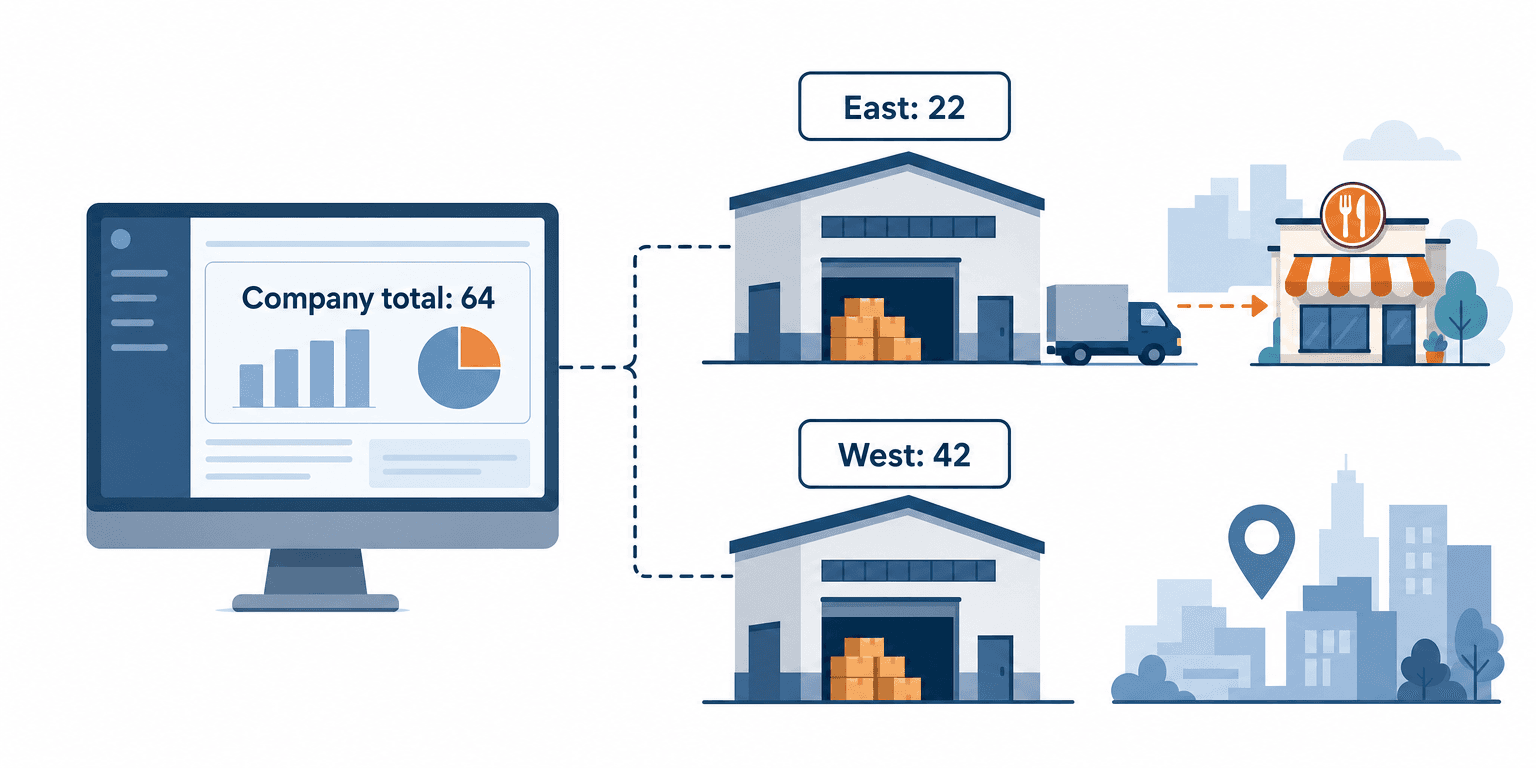
Stock at West isn’t lost. Moving it is a transfer, though, and that is a decision for operations, not a sum for the rep. Once operations creates the transfer order, Business Central counts it as incoming supply at East (Microsoft Learn: Get an availability overview), and it appears like any other receipt.
Requested Quantity, Not Stock Level
A stock level describes the warehouse. A requested quantity describes the deal, and availability only means something when you hold the two side by side.
Business Central’s own order promising makes the same split. If an order needs 10 pieces and 6 are available in inventory or on scheduled orders, it works out the remaining 4 separately (Microsoft Learn: Calculate order promising dates). So a partial answer is still an answer. When East has 22 and the customer wants 40, the rep has two honest offers:
- Ship what’s there, then the rest: 22 by December 30, and the other 18 after the next receipt.
- Ship it all at once: all 40 on the later date.
The customer chooses, not the rep. Record the answer, because Business Central’s sales order carries a setting for whether partial shipping is preferred (Microsoft Learn: salesOrder resource type).
A Split Promise is a Split Period
Here availability becomes an accounting question. If you invoice when goods ship, a split promise near month end divides revenue between two periods. At $3,450 a unit:
| Promise | December revenue | January revenue |
|---|---|---|
| All 40 by December 30, as the rep first said | $138,000 | $0 |
| 22 by December 30, 18 on January 7 | $75,900 | $62,100 |
| All 40 on January 7 | $0 | $138,000 |
Finance forecasts the first row, and the warehouse can deliver neither of the others to match it. So a split promise near month end should reach the forecast the day it’s made, not the day the shipment slips.
A Date, Not a Count
The customer asked for a date, so give the rep one: what is free at the location now, plus what arrives and when.
Business Central works the date out from setup you already keep. From a requested delivery date, it subtracts shipping time to get the planned shipment date, then outbound handling time to get the day the items must be ready to pick. If they won’t be there, it shows a stock-out warning (Microsoft Learn: Delivery date calculation for sales).
The Salesforce view gives the rep an estimate built from that same setup, in plain words. With one day of handling at East and one day of shipping to Columbus:
- Available now at East: 22.
- Next receipt at East: 30, due January 5.
- Earliest date for all 40: January 7.
The Rule: never promise stock, promise a date. A stock figure tells you what exists today; only a date tells the customer what they will receive, from where, and when.
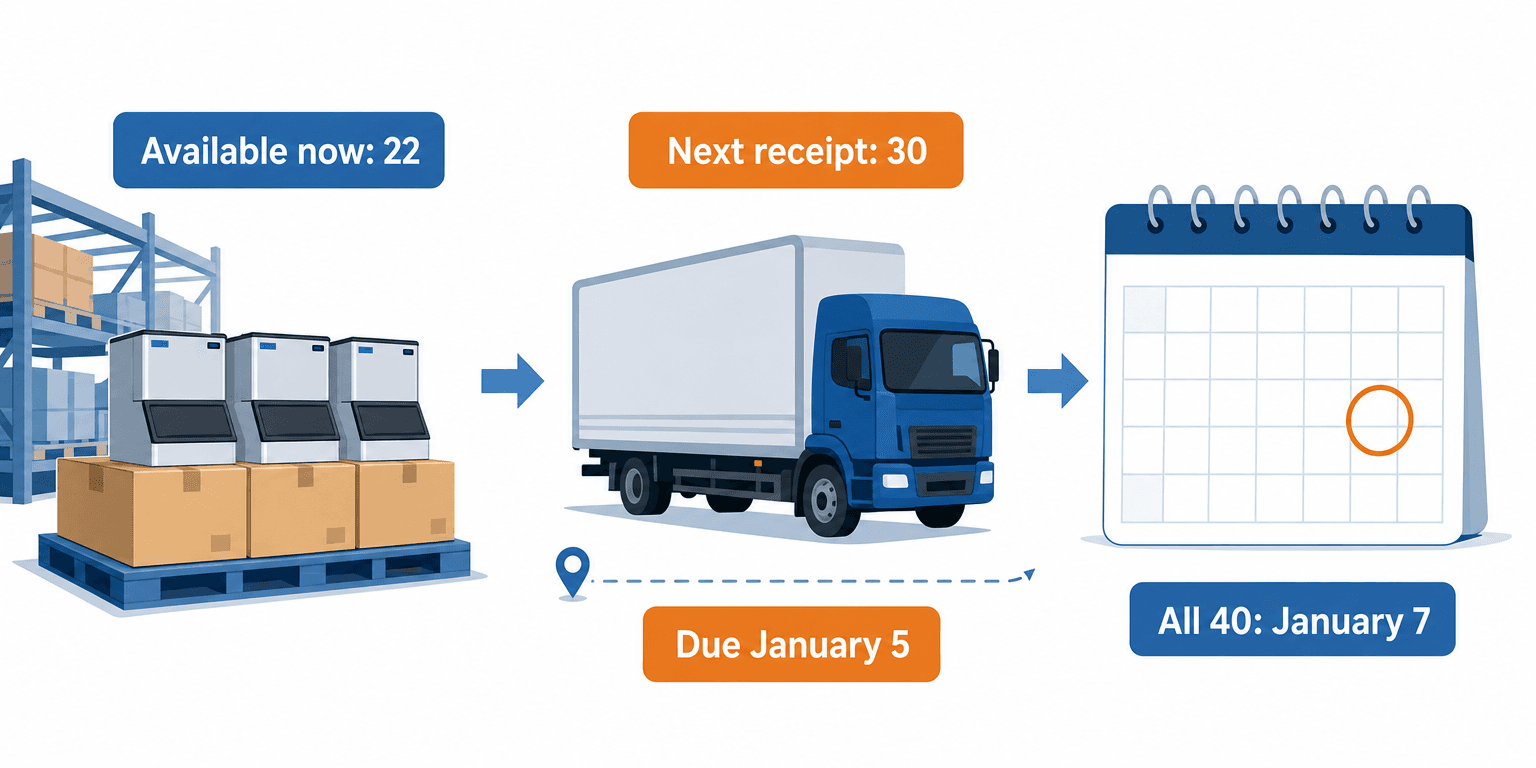
The rep doesn’t need to understand handling time. She needs one line she can read to the customer. Once the order exists, Business Central’s own order promising date is the commitment.
The Quote Holds Nothing
Here is the instinct that catches teams who fixed everything else: once the date is right on the quote, the promise is safe. It isn’t. A Salesforce quote holds no stock in Business Central.
Business Central counts demand from documents it holds, such as sales orders and outbound transfers (Microsoft Learn: Get an availability overview). A quote in Salesforce isn’t one of them, so every unit the rep promised stays free for the next order to take. Business Central can also reserve stock against a sales order line (Microsoft Learn: How to reserve items), but that starts with an order too.
So treat a date on a quote as true on the day it was checked:
- Stamp the check time beside the date, so everyone knows how old it is.
- Match the quote’s expiry to how fast your stock moves. A 30-day quote on an item that turns over weekly is a promise nobody can keep.
Recheck at Signature
The safest moment to check a promise is the moment it becomes binding. When an opportunity moves to closed won, the flow checks the quantity and date against Business Central again, before the sales order is created.
If the date holds, the order goes in. If not, the account owner hears first, with the new answer, and the customer hears it from your rep instead of from the warehouse on the day. Our guide to turning a closed-won opportunity into a sales order covers the order step itself.
The Catch-up Rule
If the availability flow was down, every promise made in the gap came from a stale view. On recovery, the flow rechecks every open opportunity whose promise was set during the outage, and every opportunity that closed won during the gap, before its order goes in. It then lists the changes for sales operations. It never rewrites a promise silently. If the outage crossed a month end, finance gets the list too.
Once the order exists, Business Central’s dates take over. Keeping those visible is a separate flow, covered in our shipment and fulfillment updates without contacting operations.
How Aonflow Checks Item Availability in Salesforce
With the five decisions made, most of the build is configuration, not a development project. The check runs when a rep adds or changes a product line, and again when stock or a receipt date changes at that location.
Aonflow lets teams:
- Connect Business Central and Salesforce with pre-built connectors, so the customer’s serving location and the availability there reach the opportunity.
- Use AI-assisted mapping for locations, receipt dates and the requested delivery date, so each one lands on the right Salesforce field without manual setup.
- Run the availability check as one workflow: read the serving location, compare the requested quantity with what is free, and work out the earliest date.
- Keep the view current with near real-time data sync, with the check time beside every date.
- Run the recheck at signature when an opportunity closes, and send a moved date to the account owner through the Slack or Microsoft Teams connector.
- Watch every run with dashboards, logs and alerts, while self-healing flows recover a breaking run and shorten the gaps the catch-up rule repairs.
Aonflow connects and orchestrates the systems you already run. Business Central still owns stock, locations and receipts, and Salesforce still owns the deal.
A Worked Example: 40 Ice Machines, 10 by December 30
Here is the restaurant group’s deal with the flow in place.
- Monday, December 7. The rep sees East: 22 available, 30 due January 5, all 40 by January 7. She offers 22 by December 30 and 18 on January 7, and the customer takes the split.
- Monday, December 14. The customer signs. During the week, another customer’s order took 12 of East’s units. The recheck at signature finds 10 left, and the account owner calls that afternoon: 10 by December 30, 30 on January 7.
- Tuesday, December 29. The warehouse ships 10, as promised. Finance has carried $34,500 in December and $103,500 in January since December 14.
Without the flow, the customer learns about the missing 30 when 10 arrive. Both versions contain bad news. The difference is who delivers it, and when: your rep, two weeks early, with a date that holds.
One step that has nothing to do with software: ask your warehouse lead which locations ship to which customers, and get the handling time for each in writing. Most wrong dates come from those two answers living in someone’s head.
Who Owns This When It Breaks
Who owns the flow? Sales operations owns what reps see in Salesforce and the recheck at signature. The operations or inventory lead owns locations, handling times and receipt dates in Business Central.
Who gets alerted when it fails? The flow owner, on the first failed run. The account owner, whenever a recheck finds a promise that no longer holds.
Where do failed records wait for review? Opportunities whose promise couldn’t be checked, such as a customer with no location on its card, wait on an exception list. Closed-won opportunities whose recheck found a moved date wait on the same list until the account owner confirms the new date with the customer, which releases the order. Sales operations reviews it every morning.
Then wire these escalation triggers:
| Trigger | Who acts |
|---|---|
| An opportunity has no serving location to check against | Sales operations |
| A recheck at signature finds the promised date no longer holds | Account owner, before the order goes in |
| A purchase order’s receipt date moves past a date promised on an open opportunity | Purchasing lead, with the account owner |
| An open opportunity’s check time is more than two hours old on a business day | Flow owner |
Security stays within the confirmed posture: data moves over HTTPS, API access is available through read-only tokens, and role-based access control decides who can change the flow.
FAQs
Can Salesforce run Business Central’s order promising?
Not directly. Order promising runs from a sales order in Business Central, and only on items marked as critical (Microsoft Learn: Calculate order promising dates). The Salesforce view works from the same inputs before an order exists. Once the order is in, Business Central’s dates are the commitment.
Should we reserve stock as soon as a quote goes out?
Usually not. Business Central reserves stock for orders, such as sales orders, and holding stock for unsigned quotes can starve customers who did sign. Keep quotes short-lived and recheck at signature.
Does building this need a developer?
No code is needed on the Aonflow side. You do need someone who knows your locations, handling times and how purchasing sets receipt dates, and someone on the Business Central side who makes availability by location and receipt dates reachable by the connector.
Conclusion
Item availability in Salesforce comes down to five decisions: serving location, not company total; requested quantity, not stock level; a date, not a count; the quote holds nothing; and recheck at signature. Settle them before the first sync, decide who owns this when it breaks, and the date your rep gives a customer is one your warehouse can keep.
Before you build anything, take last month’s late orders and check where each promise came from: a count, or a date.
Get Started with Aonflow iPaaS – Free Trial Available!
Build and deploy your integrations at zero cost. No credit card required!